How to adjust the size of images on blogger

Today I'm going to show you how to adjust the size of images posted on your blog since most of my friends are having problems with changing the size of images

first switch to "edit html" mode on your post editor and find the image you would like to adjust here's my sample image code

<a href="https://blogger.googleusercontent.com/img/b/R29vZ2xl/AVvXsEjXegrEZRUvQdwO82W3OC-Fq_YnR5gs110o43dsV2zvT1K_tuMhniTFE8FS2FW_GRky7shJ2Vir_0GJIdPZs7lYWCSzdCoeymNbmcdGo9RBXO-GOWNoeS-tFLECTFtNbMC5PgpwfGjtd4Y/s400/step-01.jpg"><img style="width:304px;height:400px;" src="https://blogger.googleusercontent.com/img/b/R29vZ2xl/AVvXsEjXegrEZRUvQdwO82W3OC-Fq_YnR5gs110o43dsV2zvT1K_tuMhniTFE8FS2FW_GRky7shJ2Vir_0GJIdPZs7lYWCSzdCoeymNbmcdGo9RBXO-GOWNoeS-tFLECTFtNbMC5PgpwfGjtd4Y/s400/step-01.jpg" border="0" alt="" id="BLOGGER_PHOTO_ID_5303081243051517074" /></a>


yours may look a bit different from mine but don't worry we are only interested in the code highlighted in red this controls the width and height of your image.
Continue reading »
How to embed adsense in blogger posts

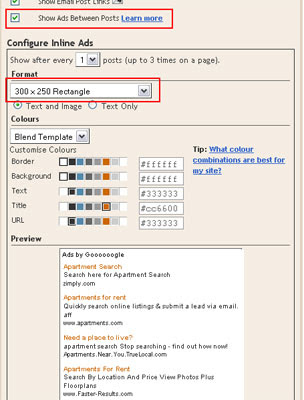
In this post i will show you how to embed AdSense ads in your blogger posts you can either have them at the top or bottom of your posts or both but remember you are only allowed a certain amount of ads on your blog so first I recommend that you download a backup copy of your template as i will not be held responsible if you mess your layout up

now if you check the box on the post widget you will see that it is a simple way to add AdSense to your blog posts


by default they are displayed at the bottom of your posts but what if we want them at the top below the post title ? or both well lets take a look at the code which is used to add the AdSense ads to the posts
Continue reading »

How to adjust margins and paddings of widgets in blogger templates

In this post i will show you how to adjust the margins and padding's of the sidebar widgets and the posts so I'm going to use the minima template


always download a backup copy of your template before doing anything or use a test blog as i can not be held responsible if you mess your blog up.

Continue reading »

How to remove the quick edit and wrench icons on blogger

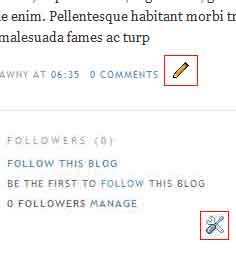
I'm writing this post because i get asked by a lot of my friends how they can get rid of those quick edit icons so if you have seen those quick edit icons under your posts and the little wrench spanner icons in the sidebar on your blog you maybe thinking how do i get rid of them or why are they there ?


in fact they are useful if you need to quickly edit your blog post's or a widget in the sidebar you can just click them to instantly edit your post or widget they are only shown to the admin of the blog if you log out you shouldn't see them but i prefer to hide or remove them since i can just login to my dashboard to edit my post or widgets
Continue reading »

How to customize your blogger templates fonts and colours

Today i will show you how to customize the fonts and colours of your template and I'm going to use the template from my previous tutorial but it will work for most templates you just need to find the id or the class name of the element you are trying to style.

Now if you are trying to change the font or colour of the sidebar titles through your blog dashboard it will also change the font and colour of the post date which is not what some of us want so to change that we can either hard code them in the CSS code or define variables for the font and colours i will show you both ways

by default all <h2></h2> tags inherit from this CSS code

h2 {
margin:1.5em 0 .75em;
font:$headerfont;
line-height: 1.4em;
text-transform:uppercase;
letter-spacing:.2em;
color:$sidebarcolor;
}

Continue reading »
Copyright © 2019 All Rights Reserved | Privacy Policy | Disclaimer Design by LawnyDesigns | Powered by Blogger